Loading...
Image Search Tool: Let Customers Search Your Catalog by Photo
The Image Search Tool lets your AI agent look up products by image. When a customer sends a photo and asks "do you have this?" or "what is this?", the agent matches it against a catalog of product images you provide and responds with what it found.
Setting Up the Tool
In your TailorTalk dashboard, go to Agent Setup, click Add Tool, and select Image Search from the Select Tool modal.
Uploading Your Product CSV
Prepare a CSV with one row per product image:
| Column | Required | Description |
|---|---|---|
product_id | ✅* | Your own identifier for the product — use the same value on multiple rows to attach several images of the same product. If your CSV has no product_id column, a sku column is accepted in its place. |
image_url | ✅ | Publicly accessible URL of the product image |
| (others) | ❌ | Any additional columns, such as the product code and title, are carried through as metadata |
* One of product_id or sku is required. Rows that share the same identifier are grouped into a single product with all of its image URLs — so a product with multiple images is several rows with the same product_id (or sku) and a different image_url each.
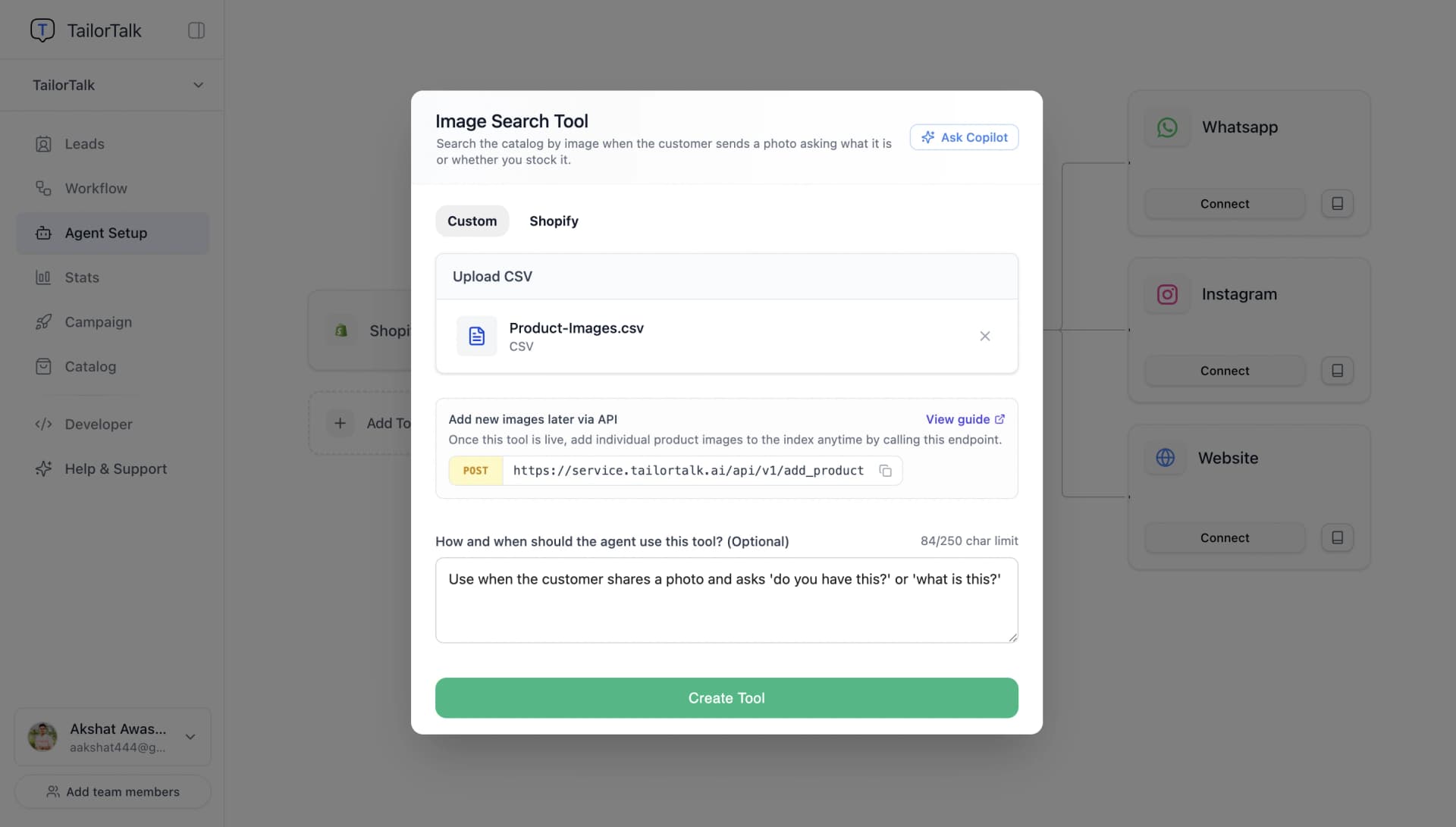
Upload the CSV in the tool's setup panel. Once it uploads successfully, you'll see the file listed as attached — you can replace it with a new CSV at any time from the same panel.
Adding Images via API
Once the tool is live, you don't need to re-upload the whole CSV to add a new product — add individual images to the index directly with the Add Image Search API. This only applies to CSV-based tools like this one — Shopify-backed tools sync automatically instead.
API Endpoint
https://api.tailortalk.ai/api/v1/add_product
Headers
| Key | Value |
|---|---|
| Authorization | Agent <token> |
| Content-Type | application/json |
You can find agent_token on the Developer page, under the API Keys tab. Click the eye icon to reveal it, or the copy icon to copy it.

Request Body
| Parameter | Required | Description |
|---|---|---|
| product_id | ✅ | Your own identifier for the product — call this endpoint again with the same productid and a different imageurl to add another image of the same product |
| image_url | ✅ | Publicly accessible product image URL |
| metadata | ❌ | Additional product information (e.g. product code, title) stored alongside the image and returned when a match is found |
Example Request
{
    "product_id": "SKU123",
    "image_url": "https://example.com/products/red-shirt.jpg",
    "metadata": {
        "product_code": "SKU123",
        "title": "Red Shirt"
    }
}
Response Format
The API returns a JSON object confirming the image was added. The response payload is wrapped automatically under a data field with success: true:
{
    "data": {
        "message": "Image added to the image-search index.",
        "image_url": "https://example.com/products/red-shirt.jpg"
    },
    "success": true
}
Notes
- Ensure that the agent access token is included in the request headers.
- The agent token determines which agent's Image Search tool the image is added to —
agent_idis derived from the token and does not need to be included in the request body. image_urlmust be publicly accessible; TailorTalk fetches it directly to index the image.- The target agent must already have an Image Search tool set up with a CSV uploaded.
Syncing from Shopify Instead
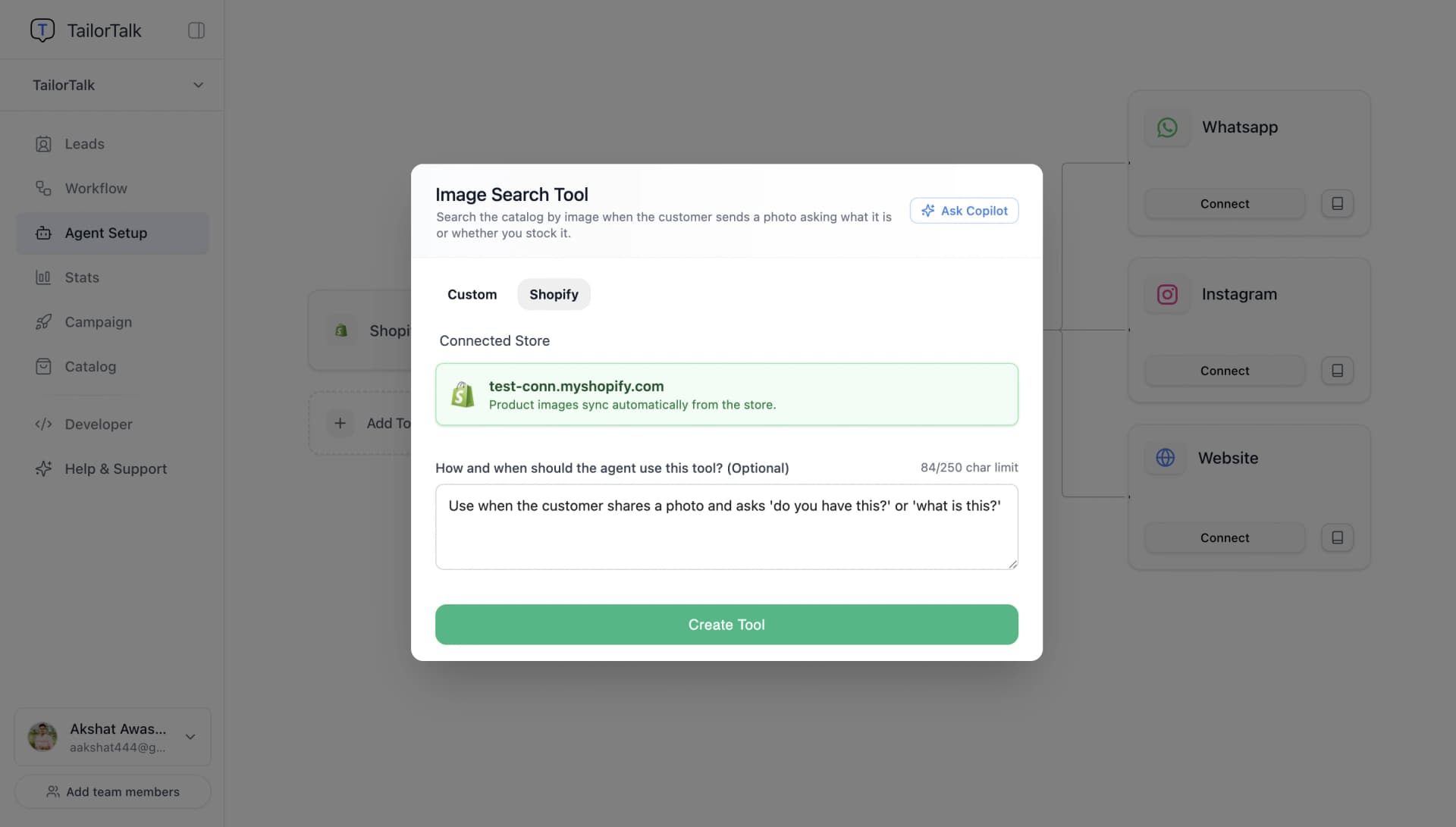
If this agent already has a Shopify tool connected, switch to the Shopify tab in the setup panel — no CSV needed, product images sync directly from your connected store.
If Shopify isn't connected yet, the panel shows a Set Up Shopify Tool button instead. Clicking it closes this dialog and opens the Shopify tool's setup so you can connect your store first; once that's done, add Image Search again and the Shopify tab will be ready to use.
Products with Variants (Colours, Sizes)
Image Search matches a photo to a product, not to a single variant. Every image is stored under the product it belongs to, so a match tells the agent which product the customer sent, and only tells it the colour or size if you've set the catalog up that way.
With a CSV, how you fill in product_id decides what the agent learns from a match:
- A different
product_idfor each variant (for exampleKURTA-REDandKURTA-BLUE): each variant is indexed as its own product with its own columns, so a match tells the agent exactly which variant it is. Use this when variants look different in photos, such as colours or prints. - One
product_idshared by all variants: all their photos are grouped under one product, but only the first row's extra columns (such as the title and product code) are kept; the other rows only add their photos. Use this when variants look the same in photos, such as sizes, and give that first row a title that fits every variant.
For example, a kurta sold in two colours, indexed as two products:
| product_id | image_url | title |
|---|---|---|
KURTA-RED | https://example.com/kurta-red-front.jpg | Cotton Kurta - Red |
KURTA-RED | https://example.com/kurta-red-back.jpg | Cotton Kurta - Red |
KURTA-BLUE | https://example.com/kurta-blue-front.jpg | Cotton Kurta - Blue |


The same applies to images added through the API: use one product_id per variant if you want the agent to know which variant matched.
With Shopify, every photo of an active product is indexed under that product, including the photos attached to its variants (up to 100 photos per product). When a photo matches, the agent gets the product's name, link, description and the options it comes in (for example every colour and size), plus the stock of the product's first variant. It isn't told which variant the matched photo belongs to, so it may ask the customer to confirm the colour or size. New, edited and deleted products stay in sync automatically.
How It Works
- A customer sends a photo in chat and asks something like "do you have this?" or "what is this?"
- The agent searches your uploaded image index for the closest match.
- If a confident match is found, the agent responds with the matching product (and any metadata you included, like its title or product code).
- If nothing matches confidently, the agent can ask the customer for another angle or say it isn't available.
Tips
- Use clear, well-lit product photos — whether uploaded via CSV in tool or added via the API — the closer they look to what a customer might photograph, the better the match quality.
- Add the product code and title as metadata — as CSV columns or API fields — so the agent can name the product, not just confirm a match. Leave out details that change over time; the index keeps what you uploaded until you upload again.
- Keep a few clear photos per product or variant rather than many near-identical ones: the agent compares the customer's photo with the 3 closest photos in your catalog, so one product with lots of similar shots can crowd out the others.
- Use the API to keep the index current as you add new products, instead of re-uploading the full CSV each time.

