
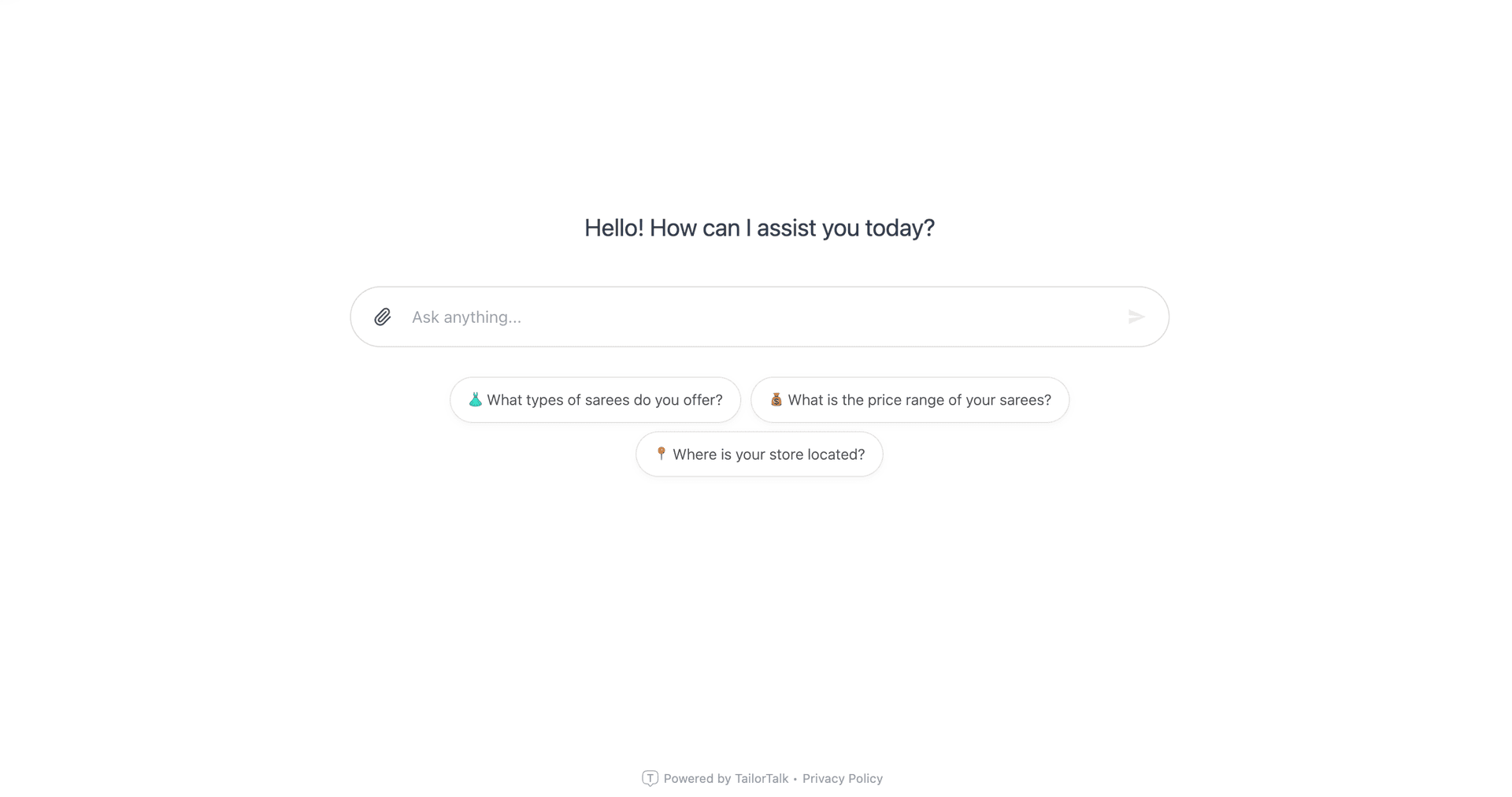
In the last year, the way people talk to AI has fundamentally changed. Your customers are no longer surprised by conversational assistants; in fact, they are now completely accustomed to the focused, full-screen workspace layout popularized by tools like ChatGPT, Claude, and Gemini. When users interact with AI, they expect a clean, distraction-free environment that gives them room to think, search, and decide. Unfortunately, most business websites are still using the outdated tiny chat bubble in the bottom-right corner. Originally designed for simple customer support ticket filing, these cramped boxes are not built for modern conversational commerce. Today, we are bringing the modern AI workspace layout to your business with the launch of Full-Screen Mode for our platform.
By adding a custom chatgpt-like widget for website use, your brand can capture high-intent traffic directly. Our platform makes this transition seamless, letting you embed a chatgpt-like widget for website pages without writing code. Setting up a chatgpt-like widget for website engagement allows organizations to greet visitors, answer complex questions, schedule live demonstrations, and steer potential buyers through custom sales funnels. Let's look at why this UI shift is a total game-changer for digital sales conversions, and how you can implement it.
Why a Full-Screen AI Interface Boosts Conversions
Moving your website assistant from a tiny corner bubble to a full-screen layout does more than just make your site look clean. It changes how users interact with your brand and drives action. Traditional popup chats are perceived as support logs, but a full-screen conversational agent acts as an interactive consultant.
Familiarity Breeds Trust: Users spend hours daily working in full-screen AI sessions. When your site offers a similar chatgpt-like widget for website visitors, it immediately looks premium, familiar, and trustworthy. According to research from Harvard Business Review, user trust in automation increases when the visual paradigm matches standard, widely-adopted consumer tools. Instead of feeling like they are talking to a basic, restricted support bot, they feel like they have access to a custom, high-tech advisor designed specifically for their needs. As research firms like McKinsey note in their industry reports, the value of getting customer personalization right is multiplying for commercial teams. With the right visual space, your AI can qualify leads and upsell products effectively.
Elimination of Background Distractions: Traditional chat widgets compete with the page content behind them—hero text, flashing banners, popups, and sidebar menus. This cognitive overload divides the customer's attention, causing them to abandon the chat before completing qualification steps. When a customer opens a full-screen session, all other visual noise disappears. The user enters a focused, distraction-free funnel where they can engage 100% with your sales assistant. Less friction means a higher completion rate for lead forms and scheduling steps, driving conversions up to two times higher than old-school support boxes. Speed is also critical; according to the classic Harvard Business Review Study on Speed to Lead, replying within 5 minutes increases conversion odds by 100x compared to waiting 30 minutes. An automated AI chat replies instantly, capturing that interest immediately.
Perfect for Visual and Complex Sales: If you are selling a high-ticket service or visual collection, a tiny chat window simply doesn't have the space to showcase what you offer. Whether you are helping a buyer browse an e-commerce catalog, look at real estate listings, or filter medical consultation availability, the extra screen real estate lets the AI present images, spec sheets, and calendar blocks with maximum clarity. It provides a spacious showcase that turns casual browsers into buyers. By matching the layout size to the value of your product, you create a natural discovery pipeline that helps customers evaluate products side-by-side inside the chat environment.
How to Set Up a ChatGPT-Like Widget for Website Growth
Setting up a custom chatgpt-like widget for website leads is a quick, no-code process. If you have already configured our Website Integration, you don't need to redeploy your existing code snippet. The toggle is fully cloud-managed and updates in real-time. This means you do not need developer resources to run layout experiments or switch between modes.
- Log into your dashboard and navigate to the widget styling configuration settings, where all aesthetic parameters are managed.
- Toggle the Full-Screen Mode setting to enable the ChatGPT-style responsive layout for your active widgets.
- Customize the brand colors, logo, font systems, and initial onboarding messages to match your corporate styling guidelines perfectly.
- Preview the conversational workspace on mobile and desktop viewports, then click save to update your website instantly.
Once activated, your chat widget will render as a lightweight, clean button in the corner of your page. When a user clicks it, it smoothly expands to fill the viewport, establishing an immersive, modern chat environment that keeps the user engaged. The transition is fully animated and optimized to run at 60 frames per second, ensuring there is no visual stutter or delay, even on low-powered mobile devices.
Optimizing Your AI Prompts for Full-Screen Engagement
Having a larger screen layout also changes how your AI should communicate. In a small chat bubble, short sentences are preferred because long text blocks require excessive scrolling. However, in a full-screen layout, short sentences can feel empty and cold. Since your widget now has room to breathe, you can configure your AI Sales Agent to deliver richer, more detailed responses. This is highly effective when recommendations require structural bullet points, comparative pricing charts, or step-by-step procedures.
To get the most out of your chatgpt-like widget for website conversions, we recommend updating your system instructions to format responses with clear markdown headings, lists, and tables. This structures the dialogue and guides the user through the sales funnel naturally, ensuring they receive the exact information required to make a purchase decision.
The Verdict: Support vs. Sales-First Automation
If your goal is just to answer support FAQs and deflect tickets, a standard, minor popup widget works fine. But if you want to turn organic traffic into booked appointments and qualified leads, you need a layout designed for sales. By upgrading to a full-screen AI Sales Agent, you give your website the ultimate virtual storefront. With the right visual space, your AI can qualify leads and upsell products effectively.
We recommend checking out our Customer Reviews to see how other growing teams have automated their workflows and achieved substantial revenue growth by moving to modern, conversational funnels. You can also explore our Pricing Plans to choose the right level of automation for your website.
References & Sources
This blog post is informed by research on generative AI sales tools, UI design conversions, and consumer behaviors in interactive digital environments. Key references include:
- Harvard Business Review Study on Speed to Lead: https://hbr.org/2011/03/the-short-life-of-online-sales-leads
- McKinsey Research on Personalization Outperformance: https://www.mckinsey.com/capabilities/growth-marketing-and-sales/our-insights/the-value-of-getting-personalization-right-or-wrong-is-multiplying
What is a ChatGPT-like widget for website leads?
A ChatGPT-like widget for website leads is an embeddable chat assistant that utilizes large language models to interact with site visitors. Unlike support bots, it is configured with custom business knowledge to answer product questions, qualify sales leads, and book meetings in a clean interface.
Does the full-screen mode work on mobile screens?
Yes, our full-screen widget is designed with mobile-first responsiveness. On mobile devices, it occupies the entire screen to provide a clean, distraction-free environment that prevents accidental clicks outside the chat window and makes it easy for users to type and read messages.
How does this compare to traditional chat bubbles?
Traditional chat bubbles are small overlays that compete with background content. Full-screen mode temporarily hides background distractions, allowing users to focus 100% on the conversation. This layout is proven to increase conversion rates for complex sales workflows.


