

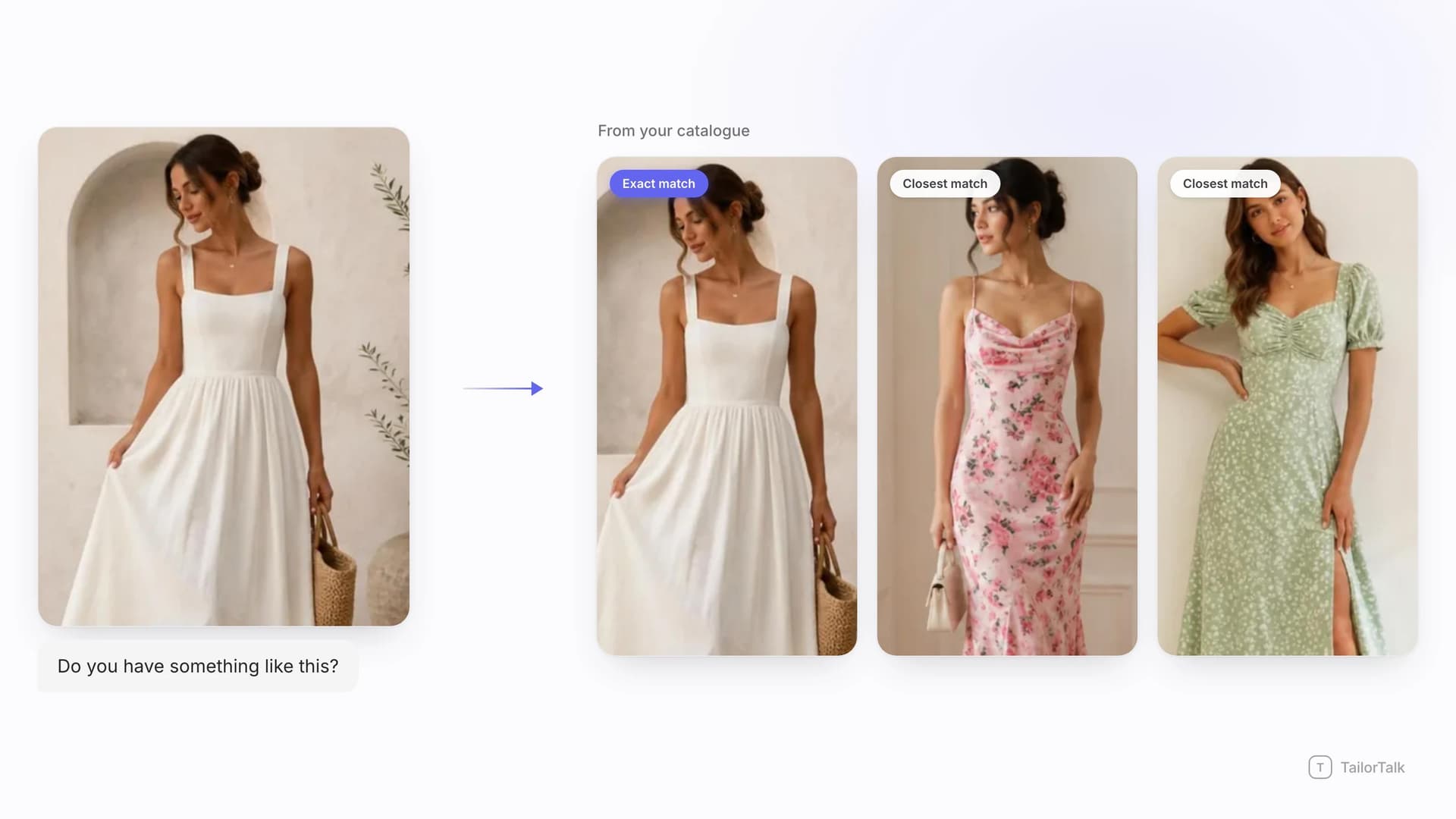
Open the DMs of almost any fashion brand and you will find the same message repeated hundreds of times a day: an image, followed by three words. "Price?" "Is this available?" "Do you have something like this?" No product code, no collection name, no link. Just a picture.
That picture is the search query. It might be a screenshot of your own reel, a photo saved from Pinterest, a shot of a friend's outfit at a wedding, or a competitor's product image. Until now, a human had to look at it, recognise it, dig through the backend for a matching code, and reply before the buyer lost interest. At a hundred messages a day that is manageable. At a thousand it quietly becomes your biggest revenue leak.
TailorTalk now closes that gap with image matching. When a customer shares a photo, the AI agent compares it against your live catalog and responds with the exact product if you carry it, or the closest styles you have in stock if you do not.
Direct answer
Visual search for fashion brands means your AI agent treats a customer's photo as a search query and answers it from your own inventory instead of asking the customer for a product code. In TailorTalk, image matching is built into the AI Catalog. When someone sends a picture in an Instagram DM, a WhatsApp chat or your website chat widget, the agent compares it against every product image in your connected catalog and replies with the SKU, price, available sizes, colour options and live stock status. When there is no exact match, it replies with the nearest alternatives you actually stock. If you build your catalog inside the TailorTalk Catalog app, this works out of the box with nothing to configure. If your products live in Shopify or a custom ERP, it works as soon as those product images are connected to your fashion AI agent.
In fashion DMs, the image is the search bar
Conversational commerce did not just move the checkout into chat. It changed the format of the question. On a website, a shopper types words into a search box and filters by category. In a DM, the shopper skips language entirely and sends a picture, because a picture is faster and more precise than any sentence they could write about a print, a drape or a shade of peach.
This is not a niche behaviour. India already has the highest social commerce penetration in the world, with roughly two-thirds of surveyed shoppers buying through social platforms, and the country's social commerce market is projected to grow from about seven billion US dollars in 2022 to roughly eighty-four billion by 2030. Instagram and WhatsApp are where a very large share of fashion discovery and fashion buying now happens, and both are image-first channels by design.
In practice, the images landing in your inbox fall into a handful of predictable types:
- A cropped screenshot of your own reel or story, with the caption and product code gone.
- A photo of the outfit on someone else, usually a friend, an influencer or a celebrity.
- A Pinterest or Google image of a style the buyer wants recreated or matched.
- A competitor's product shot, sent with "do you have this?"
- A photo of something the customer already owns, asking for a matching blouse, dupatta or accessory.
- An old catalog image from two seasons ago that is still circulating in WhatsApp groups.
Every one of those is a high-intent message. Someone who takes the trouble to find, save and send a photo is far closer to buying than someone browsing a category page. It is also the message type that has historically been slowest to answer, because it needed a human with catalog knowledge sitting at a screen.
Why product codes and text search break down here
Most fashion automation before now depended on a code being visible. If your reel creative carries a product number and the customer shares it intact, an AI agent can read the code and pull the record. That workflow is genuinely useful, and it is still the fastest path when the code survives. The problem is how often it does not.
Reshared reels lose their captions. Screenshots crop the corner where the code sat. Photos taken of a phone screen blur the text. And images that never came from you in the first place, which is a large share of what fashion brands receive, have no code at all.
Text search does not rescue this either. Buyers describe garments in the vocabulary they have, not the one your catalog uses: "the peach one with the golden border", "that heavy work lehenga from the reel", "organza saree light colour". Add regional naming, transliteration and mixed-language typing, and keyword lookup misses constantly. A photo carries dozens of attributes the buyer could never name accurately, which is exactly why they sent the photo.
The operational cost of that gap is visible in real stores. Mysore Saree Udyog, a heritage saree house with a flagship store in Bengaluru and a global online business, was pulling high volumes of inquiries from Click-to-WhatsApp campaigns and viral Instagram traffic while the team still showcased products and checked inventory by hand for every message. That manual lookup sat in front of each sale. Automating it freed more than 450 hours a month and contributed to a 20 percent jump in online sales.
How image to image matching actually works
Image to image matching skips text entirely. Instead of turning the picture into words and searching those words, it compares the picture directly against the pictures in your catalog. Here is the sequence when a customer sends a photo:
- The customer shares an image in an Instagram DM or a WhatsApp conversation with your brand.
- The agent isolates the garment in that image, separating it from the model, the background, the mirror, the hanger or the shop shelf behind it.
- It converts the garment into a visual signature covering colour and where that colour sits, print scale and repeat, silhouette and drape, neckline and sleeve shape, border and embellishment style, and fabric texture or sheen.
- That signature is compared against the signatures of every product image in your connected catalog.
- Candidates are ranked by visual similarity, then filtered by what is genuinely available, so the agent does not lead with a sold-out SKU.
- If the top candidate clears a high confidence bar, the agent answers as an exact match. If nothing clears it, the agent answers as closest matches instead of guessing.
- The reply carries the product images, code, price, sizes, colour variants and stock, and continues straight into the buying conversation.
Exact match: when you carry the product
This is the clean case, and it is most of your inbound volume if customers are sharing your own content back to you. The agent identifies the SKU and answers the way your best salesperson would: this is the product, here is the price, these sizes are in stock, here are the other colourways, here are two more photos, and here is how to pay. The customer never has to be told "please share the product code from the post", which is the single most common conversion killer in fashion DMs.
Closest match: when you do not
This is where the revenue actually hides. Three situations all end up here: the customer sent someone else's product, the item is yours but sold out, or the design was discontinued last season. The old default answer to all three was "sorry, not available", which is the worst possible reply in a category built on browsing and substitution.
With image matching, the agent instead returns the three or four closest things you do have, ranked by how visually near they are to what the customer wanted. A shopper who sent a competitor's mustard silk anarkali sees your mustard silk anarkali. Someone chasing a sold-out print sees the same print family in an available colourway. The conversation continues instead of ending, and the closest-match reply doubles as an out-of-stock recovery flow and a cross-sell prompt.
Finding the piece is only the first half of the conversation. The question that usually follows is how it will look on them, which is what virtual try-on for fashion brands is built to answer inside the same thread.
Three ways to connect your catalog
Image matching needs one thing: product images your agent can see, attached to records that carry a code, a price and a stock status. There are three routes to that, and the effort involved is very different.
1. TailorTalk Catalog app: nothing to configure
If you build your catalog in the TailorTalk Catalog app, image matching is configured automatically. There is no separate index to build, no embeddings to manage, no developer involvement and no extra setup screen. The moment your catalog is linked to your agent in Agent Setup, photos sent by customers are matched against it.
The reason it is this simple is that the Catalog app is image-first by construction. You photograph a product on your phone, the AI reads the photo and fills in name, category, colour and fabric, you confirm the price and quantity, and it goes live. Each colour variant gets its own images and its own SKU while staying linked to the parent design. In other words, the same photos that build your catalog are the photos matching runs against, so the two can never drift apart. If you have not set a catalog up yet, our guide to what an AI product catalog is walks through the full workflow and what good product data looks like.
For most boutiques, saree houses, ethnic wear labels and drop-led brands, this is the fastest route. Teams typically photograph their first twenty to thirty products in an afternoon, and every product added after that is matchable the second it is published.
2. Shopify: connect the store, images come with it
If your inventory already lives in Shopify, you do not need to rebuild anything. Connect your store through the Shopify tool, which takes four steps inside Shopify Admin: create a custom app, grant the read scopes for products, orders and customers, install it, and paste the client credentials plus your store URL into TailorTalk.
Shopify already stores images at both the product and the variant level, along with price and inventory levels, which is exactly the structure image matching wants. Once connected, your product imagery becomes the match set and your live stock decides what gets recommended. Shopify's own product API documentation shows how that catalog data is exposed. If you would rather manage everything inside the Catalog app instead, you can also export your Shopify products to CSV and import that file, and the image URLs in the export are pulled in with the products.
3. Custom ERP or in-house system
Plenty of established fashion businesses run on a custom ERP, a legacy PIM or an in-house admin panel. That works too, and the shape of the job is small. Your system needs to expose product records containing a stable SKU, a price, a live stock status and one or more reachable image URLs. That endpoint is connected through the API tool, and from there matching behaves exactly as it does for any other source.
This is the same pattern behind the larger fashion deployments already running on TailorTalk, where the agent queries the brand's own backend for real-time pricing, availability and product images rather than holding a second copy of the catalog. If your team can produce a product feed today, you are most of the way there.
Whichever route you take, the requirements are the same:
- At least one clear product image per SKU, and separate images for every colour variant.
- A stable product code that does not change between seasons or systems.
- Price and live stock status, so recommendations stay honest.
- Image URLs that are publicly reachable, if you are connecting Shopify or an ERP.
Catalog photos that match well
Match quality depends far more on your catalog imagery than on anything the customer sends. A few habits make a large difference:
- Show the full garment in frame, not a tight crop of the border or the sleeve alone.
- Shoot every colourway separately. A single photo cannot represent four colours of the same design.
- Keep lighting consistent and avoid heavy filters that shift the colour away from the real fabric.
- Avoid collage or grid images with four products in one frame, which give the matcher nothing clean to isolate.
- Keep price stickers, discount badges and large text overlays off the garment itself.
- Add one detail shot of the print, border or embellishment alongside the full-length shot.
- Retire images of products you no longer sell, so old designs stop surfacing as matches.
What this changes for stores selling on Instagram and WhatsApp
The mechanics are interesting, but the operational effect is the point. Seven things change for an image-led store the moment your AI sales agent can answer a photo, whether it arrives on Instagram, on WhatsApp, or in the chat widget on your website.
Your highest-intent message finally gets an instant answer. A photo in the DM is closer to a purchase than almost any other inbound signal, and it used to sit in a queue behind size questions and shipping queries. Now it is answered in seconds, at the moment the buyer is still looking at the picture that made them want it.
Nobody hunts for product codes any more. In most fashion teams, someone opens the backend and scrolls for a code before they can quote a single price, and that step repeats for every photo that lands in the inbox. Once the lookup disappears, staff move to fitting advice, styling, bridal consultations and order issues, which is work that actually needs a human.
Out of stock stops being a dead end. Every unmatched or unavailable photo becomes a curated set of alternatives instead of an apology, so demand that used to leak to a competitor's DM stays in your conversation.
Browsing intent gets captured. "Something like this" is one of the most common fashion messages and one of the hardest to automate with text rules. Visual similarity handles it natively, because "like this" is a statement about how something looks.
Language stops being a barrier. An image query does not need to be spelled correctly, transliterated or even written in a language your team reads. That matters enormously for brands selling across regions, to diaspora customers, and through Click-to-WhatsApp ads that pull in an audience far broader than the one your website copy was written for.
Volume spikes stop hurting. A reel going viral at midnight produces thousands of photo inquiries with no one at the desk. Mysore Saree Udyog now runs more than 8,500 leads a month through automation, so an ad surge or a viral post no longer outruns the team.
You get merchandising data you never had. The photos customers send that you cannot match are a direct, unfiltered signal of demand you are not serving: the silhouettes, colours and price points people expected to find with you. Very few brands have ever been able to read that signal at scale.
Conclusion
Fashion buying moved into chat, and in chat the customer asks with a picture. Any brand still requiring a product code, a style name or a link before it can answer is adding friction at the exact moment a buyer is ready. Image matching removes that step: the photo goes in, the product comes back, and if you do not have it, the nearest thing you do have comes back instead.
McKinsey's latest State of Fashion research puts AI-driven search and product discovery at the centre of how the industry is changing, describing AI as having moved from a competitive edge to a business necessity. Visual search for fashion brands is the most concrete version of that shift for anyone selling through DMs today, and it takes an afternoon to switch on. See how the full stack fits together on our fashion page, or book a demo and bring twenty real customer photos to test against your own catalog.
Weighing up other AI tools for your label? Our guide to the best AI tools for clothing brands compares nine of them, from on-model photos to size recommendations and reorders, with their prices.
FAQs
Do I need to tag or label my products for image matching to work?
No. Image to image matching compares the customer's photo against your product photos directly, so it does not depend on tags, keywords or descriptions being complete. Good attributes still help the agent answer follow-up questions about fabric, occasion and sizing, and the TailorTalk Catalog app fills most of those in automatically when you photograph a product.
What happens if the customer sends a competitor's product photo?
The agent will not find an exact match, so it switches to closest match mode and returns the most visually similar items you currently stock, ranked by similarity and filtered by availability. This is one of the highest-value moments in the whole flow, because the customer has already told you exactly what they want and you get to answer with your own inventory instead of losing them.
Does image matching work if my catalog is in Shopify rather than the TailorTalk Catalog app?
Yes. Connect your store through the Shopify tool in the user guide, which needs a custom app with read access to products, orders and customers. Shopify already holds images at the product and variant level along with price and inventory, so once the connection is live those product images become the match set and your live stock decides what gets recommended.
Can I use image matching with a custom ERP or in-house inventory system?
Yes. Your system needs to expose product records with a stable SKU, price, live stock status and reachable image URLs, and that endpoint is connected through the API tool. Several larger fashion brands already run this way, with the agent querying their backend for real-time pricing, availability and images rather than maintaining a second copy of the catalog.
How many product photos should I upload per item?
One clear full-length photo per colourway is the minimum, and three to five images per product is a good target. Add a detail shot of the print, border or embellishment, and photograph each colour variant separately rather than relying on a single image to represent the whole design. Avoid collages, heavy filters and text overlays that sit on top of the garment.
Which channels does image matching work on?
Instagram and WhatsApp carry most of the volume, and it behaves the same way on both. Customers share photos constantly in Instagram DMs, often as screenshots of reels and stories, and on WhatsApp they forward images from groups, saved media and other stores. The same agent and the same catalog also power the chat widget on your website, so a shopper can upload a photo there and get the same match. A buyer who starts on Instagram and continues on WhatsApp gets consistent answers throughout.
What does the agent do after it identifies the product?
It continues the sale rather than stopping at identification. The reply carries product images, the product code, price, available sizes, colour variants and stock status, and the conversation can move into recommendations, payment links or QR codes, and order confirmation without the customer leaving the chat or waiting for a human to pick up the thread.
References
- McKinsey and The Business of Fashion track how AI is reshaping product discovery and consumer search in The State of Fashion.
- Statista reports country-level adoption in its data on social commerce penetration by country.
- Statista also tracks growth projections for the India social commerce market size.
- Meta documents how business messaging works on both channels in the WhatsApp Business Platform documentation and the Instagram messaging documentation.
- Shopify documents how product and variant data, including images, can be queried in its product API reference.


