
Every fashion seller knows the message that arrives right before a sale either closes or dies. The shopper has seen the price, checked the fabric, asked about delivery, and then types the one question a product photo cannot answer: "How will it look on me?"
Until now the honest answer was a variation of "it will suit you", a link to a size chart, or an invitation to visit the store. None of those settle the doubt. The shopper says they will think about it, and a conversation that was two messages away from payment goes quiet.
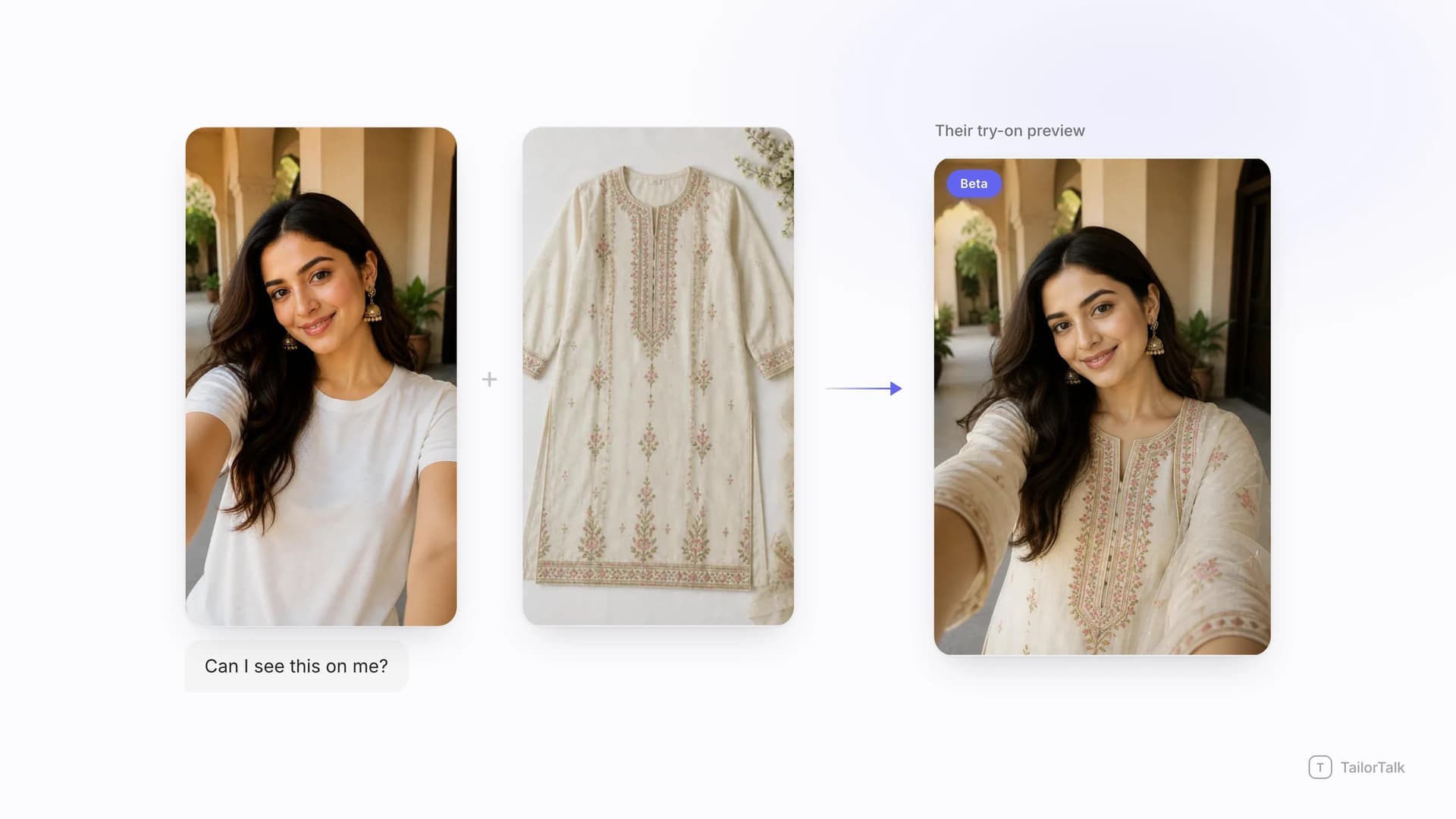
TailorTalk is now testing a way to answer that question directly. With the shopper's consent, they share a photo of themselves in the chat, and the agent generates a preview of them wearing the piece from your catalogue, in the same thread, without anyone leaving the conversation.
Direct answer
Virtual try-on for fashion brands means a shopper can see your product on their own body before they pay, without a fitting room and without an app. In TailorTalk it runs inside the conversation on Instagram, WhatsApp and your website chat widget. The shopper opts in and sends one clear photo, the agent pairs it with the garment image already sitting in your AI Catalog, and it returns a try-on preview the shopper can look at, save and forward. This capability is currently in beta and is not switched on by default. We enable it per brand, so if you want it on your account you have to ask us for access.
The question a product photo cannot answer
Fashion is the one category where the buyer is not really purchasing the object in the photo. They are purchasing a version of themselves. A flat product shot, or even a shot on a model, tells them almost nothing about how the neckline will sit on their frame, how the colour will read against their skin, or whether the drape will work on their height.
That uncertainty is expensive, and it shows up in the returns data. Clothing and shoes are consistently the most returned categories in online retail, well ahead of everything else people buy on the internet, and the share of apparel bought online that comes back keeps climbing. Every one of those returns started as a shopper guessing.
In chat-led selling the cost shows up earlier than that. Most of the doubt never becomes a return, because it never becomes an order. It becomes a shopper who stops replying, and you never learn which product lost them.
How it works inside the conversation
The flow is deliberately simple, because it has to work for someone shopping from their phone in a WhatsApp thread.
- The shopper asks how something will look on them, or the agent offers a preview at the moment hesitation shows up.
- They opt in and send one clear photo of themselves. Nothing happens unless they choose to share it.
- The agent takes the garment image already in your catalogue, so the preview is built from the exact product you are selling rather than a generic stand-in.
- It generates the try-on preview and sends it back into the same thread, usually while the shopper is still on the chat.
- The conversation carries on from there: sizes, colour variants, price, and payment, with the doubt already handled.
The important design decision is that the shopper starts it. This is a consent-first flow, the photo comes from them, and the agent only uses it to build the preview they asked for. That framing matters commercially as well as ethically, because a shopper who was pushed into sending a photo is not a shopper who converts.
What you need in place first
Try-on sits on top of the catalogue you already have, so the setup work is the setup you should be doing anyway.
- A connected product catalogue with clean garment images, built in the TailorTalk Catalog app, synced from Shopify, or pulled from your own system.
- One clear image per garment, ideally a flat lay or a straight-on product shot rather than a heavily styled editorial frame.
- Your channels connected, whether that is Instagram, WhatsApp, or the chat widget on your site.
- Beta access on your account, which our team enables manually.
If your catalogue is not built yet, start there. Our guide to what an AI product catalog is covers how sellers turn a camera roll into structured products in an afternoon, and everything else in the fashion stack, including try-on, runs off that same catalogue.
Where virtual try-on adds the most value
This is not a novelty feature that suits every product equally. It earns its place in specific, high-value moments.
Occasion, bridal and high-ticket pieces
The higher the price, the longer the hesitation. Lehengas, heavy sarees, embroidered kurta sets, gowns and formal suits are exactly the products where a shopper stalls the longest and where a lost conversation costs the most. A preview does not replace a trial in store, but it converts "I need to see it first" into "send me the size chart", which is a completely different conversation.
The forward-to-my-sister effect
Occasion wear is rarely a solo decision. The preview is an image, which means it gets forwarded to a mother, a sister, a friend, a bride's group chat. Your product now travels through the shopper's own network attached to a person they trust, and that is distribution you could not have bought. A product photo almost never gets shared that way. A photo of someone in the outfit does.
Shoppers who cannot walk into your store
Plenty of fashion demand comes from people nowhere near your shop, including customers buying across cities and diaspora buyers ordering for weddings back home. For them the store visit is not an option, so the try-on preview is the closest thing to a trial room they will get. Brands already handling this kind of remote high-ticket demand, like Mysore Saree Udyog, lean on video consultations for the same reason, and a preview does that job earlier and without scheduling anything.
Fewer guessed orders, fewer returns
An order placed after the buyer has seen the piece on themselves is a more confident order. It will not fix a wrong measurement, but a meaningful share of apparel returns are not about measurement at all. They are about a garment that did not look the way the buyer imagined, and that is precisely the gap a preview closes.
It pairs with image matching
The two features chain together well. A shopper sends a screenshot of something they saw elsewhere, image matching returns the closest pieces from your catalogue, and try-on then puts the best of those on the shopper. Inspiration to product to preview to payment, all inside one thread. Our write-up on visual search for fashion brands covers the first half of that chain in detail.
A reason to reopen a cold thread
Fashion inboxes are full of conversations that went quiet at the consideration stage. "Want to see how this looks on you?" is a far better re-engagement message than "just following up", because it offers the shopper something instead of asking them for something.
Being straight about the limits
It is in beta for a reason, and it is worth setting expectations with your team before you set them with customers.
- A preview is a visualisation, not a fitting. It does not measure the shopper or tell them their size, so your size chart still does that job.
- Output quality tracks input quality. A clear, well-lit, front-facing photo produces a far better preview than a dark, heavily filtered or tightly cropped one.
- Heavily structured or highly draped pieces are harder to represent than simpler silhouettes, so results vary by garment type.
- It is consent-first by design. The shopper opts in and shares the photo themselves, and it should stay an offer rather than a demand.
- Access is limited while the feature is in beta, so it is enabled account by account rather than being available to everyone at once.
How to get access
Because this is a beta, there is no self-serve switch in the dashboard. Our team turns it on for your account. The practical path is to get your catalogue and channels in place first, then talk to us about enabling try-on for a specific collection rather than your entire inventory. Start it where hesitation is most expensive, usually occasion and bridal, watch how shoppers respond, and widen from there.
Conclusion
McKinsey's State of Fashion research describes AI moving from a competitive edge to a business necessity, with product discovery and customer conversations among the first places it lands. Virtual try-on is the version of that shift a shopper can actually feel, because it answers the oldest question in fashion retail at the exact moment it gets asked.
If you already run your DMs on TailorTalk, this is a small addition to a stack you have. If you are still answering "how will it look on me" by hand, see how the rest of the fashion agent fits together first, then ask us for beta access when your catalogue is ready.
FAQs
Is virtual try-on available on my account right now?
Not automatically. The feature is in beta and is enabled per brand by our team rather than being switched on by default for everyone. If you want it on your account, ask us and we will look at your catalogue and channels and turn it on for a collection to start with.
Does the shopper need to install an app to try something on?
No, and that is the point of running it inside chat. The shopper stays in the same Instagram DM, WhatsApp thread or website chat window they were already using, opts in, and sends one photo. There is no app download, no account creation and no separate try-on page to visit.
What happens to the photo a shopper sends?
The flow is consent-first, so nothing starts unless the shopper chooses to share a photo of themselves. The image is used to generate the preview they asked for as part of that conversation. It should always be presented as an offer the shopper can decline, not a requirement for getting help.
Will virtual try-on tell customers their correct size?
No. It shows how a garment is likely to look on the shopper, not what size they should order. Sizing still comes from your size chart, your measurements guidance and your team. Think of it as removing the visual doubt, while the fit question is answered the way it always was.
Which products work best with try-on previews?
Occasion wear, bridal, and high-ticket pieces get the most out of it, because those are the purchases where shoppers hesitate longest and where a lost conversation costs the most. Simpler silhouettes tend to preview more reliably than very structured or heavily draped garments, so it is worth starting with one collection and reviewing the results.
Do I need a specific catalogue setup for this to work?
You need a connected catalogue with clean garment images, which can be built in the TailorTalk Catalog app, synced from Shopify, or pulled from your own system through an API. A clear flat lay or straight-on product shot works better than a heavily styled editorial image, and that same catalogue also powers product answers and image matching.
References
- Statista shows which categories customers send back most often in its chart on the most returned online purchases.
- Statista also tracks the share of online returns in apparel worldwide.
- McKinsey and The Business of Fashion cover AI adoption across the industry in The State of Fashion.
- Meta documents how media is exchanged in business conversations in the WhatsApp Business Platform documentation and the Instagram messaging documentation.


